

Rails Generators for Authentication and Setup
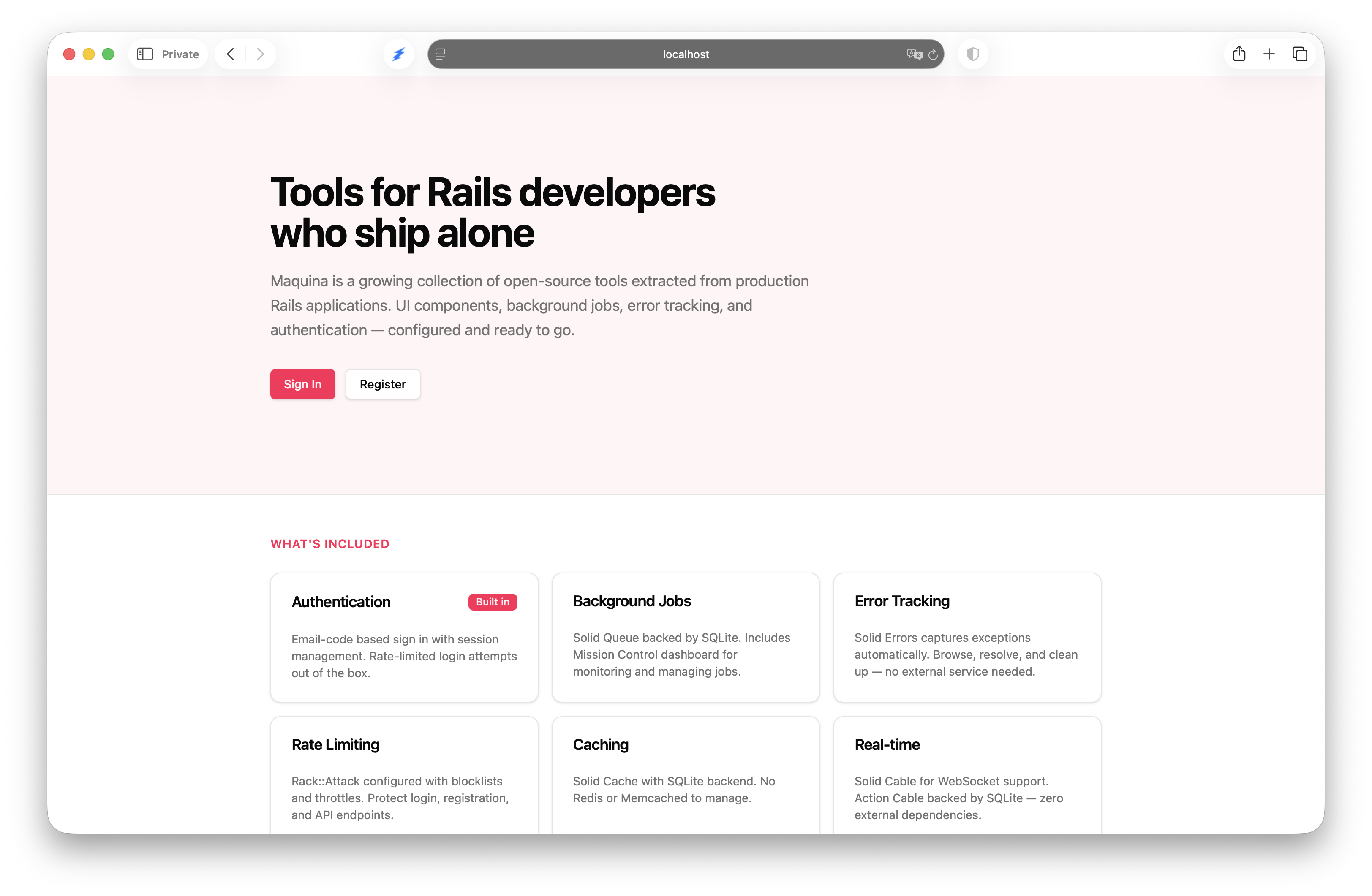
Rails generators that write standalone code: passwordless auth, passkeys, Rack::Attack scanner bans with a Security dashboard, CSP violation reports, job queues and error tracking.
Rails generators that produce standalone application code. No runtime dependency — generate once, own the code forever. Delete the gem when you’re done.
What Is This?
After rails new, every developer follows the same steps: configure authentication, set up request throttling, wire up a job queue, add error tracking. These steps aren’t gaps in the framework — they’re workflow choices that are repetitive and time-consuming.
Maquina Generators make the post-rails new setup as deterministic as the framework itself. The gem is development-only. Everything it produces lives in your app and is yours to modify.
rails new myapp --css tailwind
bundle add maquina-generators --group development
rails generate maquina:app --auth clave
bin/rails db:migrate
bin/dev
Five commands. Auth, multi-tenancy, roles, job queue, error tracking, request protection and a dashboard of what it refused — all generated, all yours.
Quick Start
1. Create a Rails App
rails new myapp --css tailwind
cd myapp
2. Add the Gem
bundle add maquina-generators --group development
3. Run the App Generator
rails generate maquina:app --auth registration
4. Finish Setup
bin/rails db:migrate
bin/rails credentials:edit
# Add: backstage: { username: admin, password: your_password }
bin/dev
Available Generators
| Generator | Command | Purpose |
|---|---|---|
| App | rails g maquina:app |
Full application setup (orchestrator) |
| Clave | rails g maquina:clave |
Passwordless email-code authentication |
| Passkeys | rails g maquina:passkeys |
Passkey sign-in on top of Clave |
| Registration | rails g maquina:registration |
Password-based auth with accounts and roles |
| Rack Attack | rails g maquina:rack_attack |
Scanner and flood bans, request throttling |
| Security | rails g maquina:security |
Dashboard of every Rack::Attack refusal |
| CSP Reports | rails g maquina:csp_reports |
Content Security Policy violation endpoint, on the Security page |
| Solid Queue | rails g maquina:solid_queue |
Background job processing |
| Solid Errors | rails g maquina:solid_errors |
Error tracking dashboard |
| Mission Control | rails g maquina:mission_control_jobs |
Job queue monitoring dashboard |
The App Generator
The orchestrator. Runs after rails new and configures a complete, production-ready application in a single command.
rails g maquina:app --auth clave --prefix /admin --port 3000
rails g maquina:app --auth clave --passkeys
What It Does
- Adds gems — brakeman, standard, rails-i18n, maquina-components, aws-sdk-s3
- Creates configs — Procfile.dev, .rubocop.yml, .standard.yml
- Configures environments — letter_opener for dev, APPLICATION_HOST for production
- Installs Rails features — Action Text, Active Storage, Turbo morphing
- Runs auth generator — your choice of clave, registration, or none
- Runs sub-generators — solid_queue, mission_control_jobs, solid_errors, and security (which brings the rack_attack rules), then passkeys with
--passkeys - Installs Solid adapters — Solid Queue, Solid Cache, Solid Cable, Solid Errors
- Installs Maquina Components — UI library ready to use
- Creates HomeController — with root route
- Sets up multi-database — primary, queue, cache, cable, errors, security
Options
| Option | Default | Description |
|---|---|---|
--auth |
none |
Authentication: none, clave, or registration |
--passkeys |
false |
Add passkey sign-in; needs --auth clave |
--prefix |
/admin |
URL prefix for ops dashboards |
--port |
3000 |
Development server port |
With --passkeys, the app generator runs maquina:passkeys after the security generator, so the passkey throttle lands in the Rack::Attack rules. It refuses to run without --auth clave, before touching anything. The passkey origin follows --port, the home page links signed-in people to /passkeys, and the post-install message reminds you to set WEBAUTHN_RP_ID and WEBAUTHN_ORIGINS before production.
Generated Database Configuration
development:
  primary:
    database: storage/development.sqlite3
  queue:
    database: storage/development_queue.sqlite3
  cache:
    database: storage/development_cache.sqlite3
  cable:
    database: storage/development_cable.sqlite3
  errors:
    database: storage/development_errors.sqlite3
  security:
    database: storage/development_security.sqlite3
Authentication: Clave (Passwordless)
Complete passwordless authentication using email verification codes. Users receive a 6-digit code via email to sign in — no passwords to manage, no password resets to build.
rails g maquina:clave
What You Get
Models:
Account— multi-tenant container (has_many :users)User— with role enum (member/admin), account association, blocking supportSession— browser session tracking with IP and user agentEmailVerification— encrypted verification codes with expiry and a wrong-guess lockCurrent—ActiveSupport::CurrentAttributeswith session, user, and account
Controllers:
SessionsController— email entry for sign-inSession::VerificationsController— code verificationSession::VerificationResendsController— resend with 15-minute cooldownRegistrationsController— account creation (optional)- Registration verification controllers
Additional:
VerificationMailer— HTML + text email templatesAuthenticationCleanupJob— daily cleanup of expired sessions and codesSessionTestHelper—sign_in_as(user)andsign_outfor tests- Full i18n support (English and Spanish)
How It Works
User enters email → receives 6-digit code → enters code → signed in
- Codes expire in 15 minutes
- 15-minute cooldown before resend
- Rate limited: 10 attempts per 3 minutes
- A code locks after 5 wrong guesses, however many addresses they come from
- Codes are encrypted at rest and compared in constant time
- Sessions last 30 days (configurable)
+characters blocked in emails to prevent alias attacks
Codes use Active Record encryption rather than a digest, because the mail goes out through deliver_later, whose job has to read the code back. The generator adds the encryption keys to config/credentials.yml.enc when they are missing; without a master key, run bin/rails db:encryption:init.
Multi-Tenancy
Every user belongs to an Account. The first user who creates an account becomes its admin.
# Access anywhere in your app
Current.user          # The signed-in user
Current.account       # The user's account
Current.user.admin?   # Check role
Scoping Queries
class ProjectsController < ApplicationController
  def index
    @projects = Current.account.projects
  end

  def create
    @project = Current.account.projects.build(project_params)
    # ...
  end

  private

  def set_project
    @project = Current.account.projects.find(params[:id])
  end
end
Options
| Option | Default | Description |
|---|---|---|
--skip-views |
false |
Skip view templates |
--skip-registration |
false |
Skip sign-up flow (sign-in only); the sign-in page has no sign-up link |
Authentication: Passkeys
Passkeys as a second way to sign in, on top of Clave. People add passkeys from a /passkeys page and sign in with Face ID, a fingerprint or a device PIN — with a button, or straight from the email field’s autofill. The email code stays as the way in without a passkey, so removing every passkey never locks anyone out.
rails g maquina:clave      # first
rails g maquina:passkeys
bin/rails db:migrate
Then link to passkeys_path from your account or settings page. On a new app, rails g maquina:app --auth clave --passkeys does both and adds the link.
The webauthn gem handles only the cryptography: parsing, signatures, and the origin, challenge and user-verification checks. The flow — controllers, model, views and JavaScript — is generated into your app. There is no JavaScript dependency: the Stimulus controllers use the browser’s own PublicKeyCredential.parseCreationOptionsFromJSON, parseRequestOptionsFromJSON and toJSON(). The names (passkeys table, credential_id, Session::PasskeysController) follow the passkeys work proposed for Rails itself, so moving to it later is cheap.
What You Get
Models:
Passkey— credential id, public key, sign count, transports, AAGUID (named after its provider, such as iCloud Keychain or Google Password Manager), backup flags and last useUser#webauthn_id— a random user handle, created on first use
Controllers:
Session::PasskeyChallengesControllerandSession::PasskeysController— sign-in without an email, then Clave’sstart_new_session_forPasskeyChallengesControllerandPasskeysController— add, rename and remove passkeys
Additional:
config/initializers/webauthn.rb— the relying party- A
sessions/_passkeypartial on the sign-in page, andautocomplete="username webauthn"on its email field passkey_sign_in_controller.jsandpasskey_registration_controller.js- A
passkey/ipRack::Attack throttle, whenconfig/initializers/rack_attack.rbexists register_passkeyandsign_in_with_passkey(user)test helpers onWebAuthn::FakeClient, and an integration test covering the flow- English and Spanish translations
How It Works
Sign in with an email code → add a passkey on /passkeys → next time, pick it from autofill or the button
- Sign-in sends no email address: the browser offers the passkeys it holds for the site
- Every ceremony requires user verification (biometrics or device PIN)
- Challenges live in the session, are used once and expire after 5 minutes
- The returned user handle must match the passkey’s owner, and blocked users are refused
- A signature counter that goes backwards is refused
- Adding or removing a passkey needs a sign-in from the last 30 minutes, so a stolen session cookie cannot plant a passkey that outlives it
- A removed passkey gets a 404, and the browser is told to forget it (
signalUnknownCredential) - Rate limited: 10 attempts per 3 minutes, plus the Rack::Attack throttle
Production
Passkeys are bound to a domain, and changing rp_id later orphans every saved passkey. Set it before the first user adds one:
WEBAUTHN_RP_ID=example.com
WEBAUTHN_ORIGINS=https://example.com,https://app.example.com
Or put webauthn: { rp_id:, origins: } in the credentials. Production refuses to boot while the relying party is still localhost, except during the asset build. rp_id can be a parent of the origins’ host; to share passkeys across different domains, publish /.well-known/webauthn.
Testing in a Browser
Chrome’s virtual authenticator works in DevTools (More tools → WebAuthn) or over CDP. It answers the sign-in page’s autofill request on its own, so loading /session/new signs you in without a click; to test the button, make PublicKeyCredential.isConditionalMediationAvailable return false. On a dev server that isn’t on port 3000, set WEBAUTHN_ORIGINS=http://localhost:<port>.
Options
| Option | Default | Description |
|---|---|---|
--skip-views |
false |
Endpoints only; bring your own UI |
--quiet |
false |
Skip the post-install instructions |
Every step is idempotent. Anything the generator cannot place safely — a User model or sign-in page that no longer has Clave’s shape — is printed after the install for you to add by hand.
Authentication: Registration (Password-Based)
Password-based authentication that builds on Rails 8’s built-in rails generate authentication. Adds multi-tenancy with an Account model, user roles, and a registration flow.
rails g maquina:registration
What It Adds to Rails Auth
Rails 8’s authentication generator gives you login but no signup. Registration adds:
Accountmodel withhas_many :users- User gains
belongs_to :accountand role enum (admin/member) Current.accountdelegationRegistrationsController— creates Account + User in a single transaction- Tailwind-styled views
- English and Spanish translations
Generated Models
class Account < ApplicationRecord
  has_many :users, dependent: :destroy
  validates :name, presence: true
end

class User < ApplicationRecord
  has_secure_password
  has_many :sessions, dependent: :destroy
  belongs_to :account
  validates :name, presence: true
  enum :role, { member: "member", admin: "admin" }, default: "member"
end

class Current < ActiveSupport::CurrentAttributes
  attribute :session
  delegate :user, to: :session, allow_nil: true
  delegate :account, to: :user, allow_nil: true
end
Registration Flow
class RegistrationsController < ApplicationController
  allow_unauthenticated_access
  rate_limit to: 10, within: 3.minutes, only: :create

  def create
    ActiveRecord::Base.transaction do
      account = Account.create!(name: params[:account_name])
      user = account.users.create!(
        name: params[:name],
        email_address: params[:email_address],
        password: params[:password],
        role: :admin
      )
    end
    start_new_session_for user
    redirect_to root_path
  end
end
Options
| Option | Default | Description |
|---|---|---|
--skip-views |
false |
Skip view templates |
Rack Attack
Request protection with Rack::Attack. Bans vulnerability scanners and addresses that ignore the throttle, instead of refusing one request at a time.
rails g maquina:rack_attack
rails g maquina:rack_attack --login-path /sign_in
Default Protections
| Rule | Trigger | Response |
|---|---|---|
Scanner ban (fail2ban/scanners) |
3 scanner paths in 10 minutes | 403, IP banned for 7 days |
Flood ban (allow2ban/flood) |
600 requests in 5 minutes | 403, IP banned for 1 day |
General throttle (req/ip) |
Over 300 requests in 5 minutes | 429 |
Sign-in throttle (login/ip) |
Over 5 POST /session in 20 seconds |
429 |
| Safelist | 127.0.0.1, ::1 |
Never refused |
A scanner sprays hundreds of guesses in a couple of minutes. Refusing each matching path lets every other guess through to routing, so the third scanner path bans the address for a week. The flood ban is twice the general throttle: an address still sending at that rate has ignored every 429 since it hit the limit.
Scanner paths are PHP files (*.php), WordPress paths (/wp-admin, /wp-login, /xmlrpc.php), sensitive files anywhere in the path (.env, .git, .aws, .ssh, /etc/passwd), backup archives (.zip, .sql, .tar.gz, .bak) and scanner targets (/cgi-bin, /phpmyadmin, /actuator). /rails/active_storage is exempt from the scanner rule and the general throttle, and /assets from the throttle.
Every refusal is logged as an [ATTACK] line with its IP — Rack::Attack answers before Rails, so it is the only trace in the log. To see refusals on a page, add the Security Dashboard.
Tuning
The knobs are constants on Rack::Attack in config/initializers/rack_attack.rb:
SCANNER_MAXRETRY = 3
SCANNER_FINDTIME = 10.minutes
SCANNER_BANTIME = 7.days

GENERAL_LIMIT = 300
GENERAL_PERIOD = 5.minutes
FLOOD_MAXRETRY = GENERAL_LIMIT * 2
FLOOD_BANTIME = 1.day

LOGIN_PATH = "/session"
LOGIN_LIMIT = 5
LOGIN_PERIOD = 20.seconds
Rack::Attack.banned?(ip) answers whether an address is banned right now. Bans and counters live in Rails.cache, so production needs a shared store such as Solid Cache.
Options
| Option | Default | Description |
|---|---|---|
--login-path |
/session |
Path whose POST the sign-in throttle counts |
Solid Queue
Sets up Solid Queue as your Active Job backend with a separate database and Procfile integration.
rails g maquina:solid_queue --database sqlite3
Configuration
# config/solid_queue.yml
default: &default
  dispatchers:
    - polling_interval: 1
      batch_size: 500
  workers:
    - queues: "*"
      threads: 3
      polling_interval: 0.1
  recurring:
    authentication_cleanup:
      class: AuthenticationCleanupJob
      schedule: every day at 3am
Options
| Option | Default | Description |
|---|---|---|
--database |
sqlite3 |
Database adapter (sqlite3 or postgresql) |
Solid Errors
Error tracking dashboard with custom Tailwind views and HTTP basic auth.
rails g maquina:solid_errors --prefix /admin
What You Get
- Custom Tailwind-styled error views
- HTTP basic auth (credentials-first, ENV fallback)
- Severity badge helpers
- Clipboard and backtrace filter Stimulus controllers
- Engine mounted at
<prefix>/errors - Self-contained mailer templates, so
send_emailsworks without the dashboard’s helpers - Shared admin navigation bar (Overview, Errors, Jobs, Security) and the admin overview at
<prefix>
Authentication
# Checks in order:
# 1. Rails.application.credentials.backstage.username / .password
# 2. ENV["SOLID_ERRORS_USER"] / ENV["SOLID_ERRORS_PASSWORD"]
Set up credentials:
bin/rails credentials:edit
backstage:
  username: admin
  password: your_secure_password
Options
| Option | Default | Description |
|---|---|---|
--prefix |
required | URL prefix (e.g., /admin) |
--user-env-var |
SOLID_ERRORS_USER |
Custom env var for username |
--password-env-var |
SOLID_ERRORS_PASSWORD |
Custom env var for password |
--copy-views |
true |
Include custom Tailwind views |
Mission Control Jobs
Job queue monitoring dashboard with custom Tailwind views. 41 view files styled to match your application.
rails g maquina:mission_control_jobs --prefix /admin
What You Get
- Full Tailwind-styled dashboard for Solid Queue
- Job status badges, queue views, worker monitoring
- Recurring task management
- Engine mounted at
<prefix>/jobs - Shared admin navigation (Overview, Errors, Jobs, Security) and the admin overview at
<prefix> - HTTP basic auth (same credentials as Solid Errors)
Options
| Option | Default | Description |
|---|---|---|
--prefix |
required | URL prefix (e.g., /admin) |
--user-env-var |
MISSION_CONTROL_JOBS_USER |
Custom env var for username |
--password-env-var |
MISSION_CONTROL_JOBS_PASSWORD |
Custom env var for password |
--copy-views |
true |
Include custom Tailwind views |
Security Dashboard
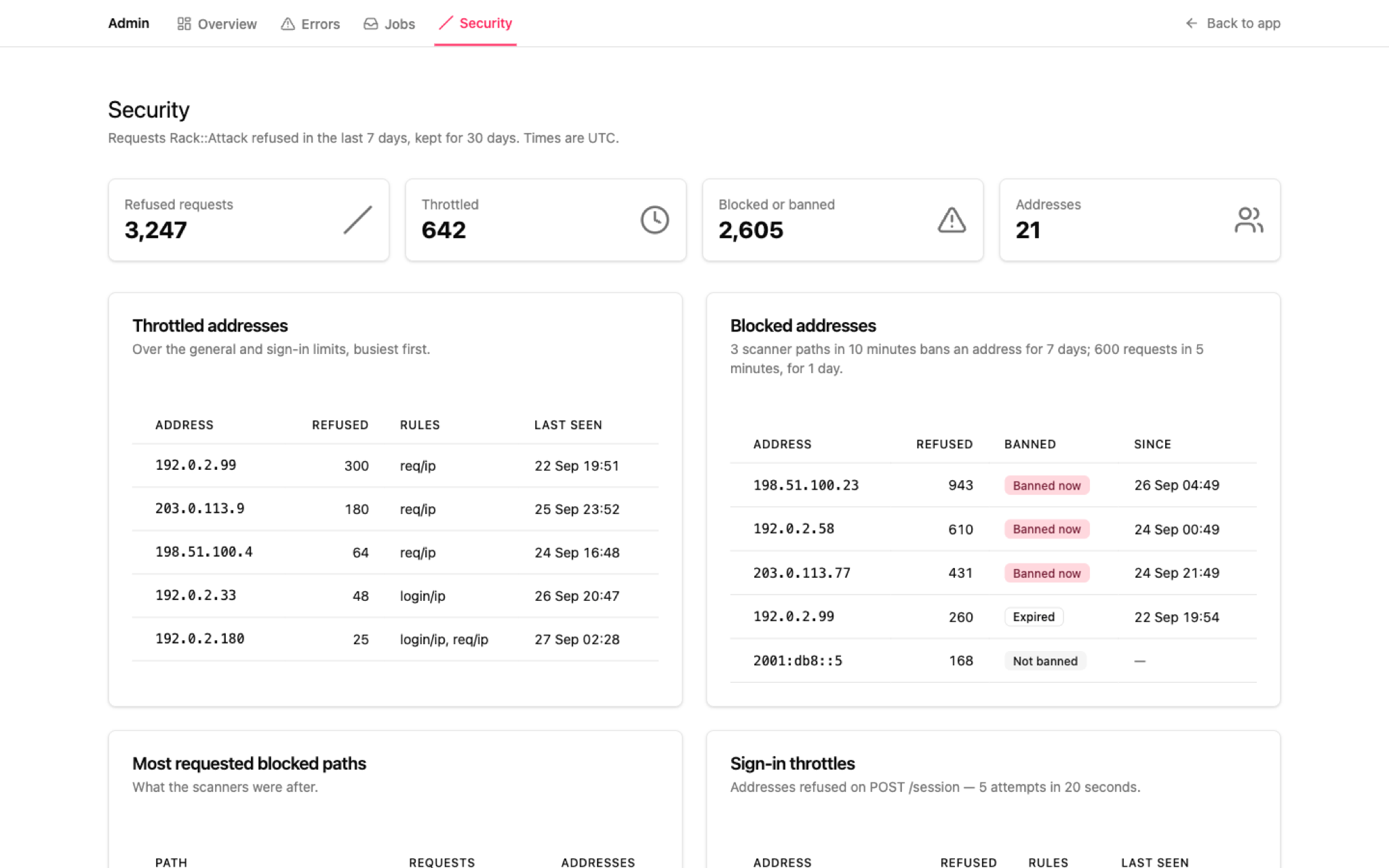
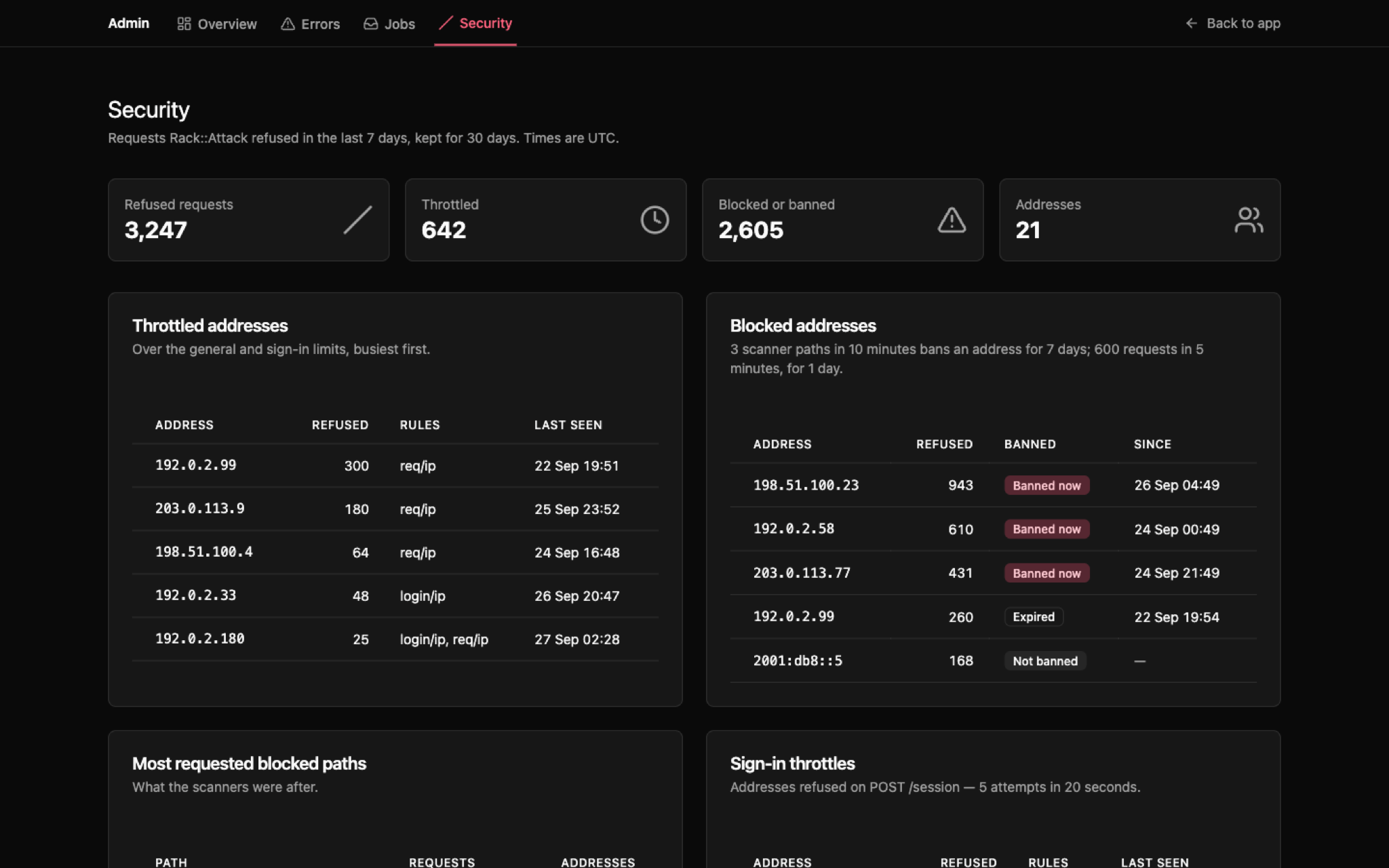
A backstage page for everything Rack::Attack refused in the last 7 days, next to Solid Errors and Mission Control Jobs.
Each throttled, blocked or banned request is recorded as a Security::AbuseEvent in its own security database and kept for 30 days.
rails g maquina:security --prefix /admin
bin/rails db:prepare
What the Page Shows
The top five of each, for the last 7 days. Times are UTC. No filters and no pagination: it is a briefing, not a log viewer.
| Section | What it answers |
|---|---|
| Stats | Refused requests, throttled, blocked or banned, distinct addresses |
| Throttled addresses | Who went over the general or sign-in limit, and which rules they hit |
| Blocked addresses | Every address a blocklist refused: Banned now, Expired, or Not banned |
| Most requested blocked paths | What the scanners were after |
| Sign-in throttles | Addresses refused on POST /session, kept apart from scanner noise |
| Targeted hosts | Which hostnames the refusals were aimed at |
| By day | Throttled, blocked and banned per day, zeros kept so a spike reads against its neighbours |
| Recent refusals | The last 20, newest first |
Banned now is Rack::Attack’s own answer at render time, so an expired ban flips its badge instead of disappearing. Not banned is an address with a strike or two on the scanner rule — or a slow scanner that stays under three paths in ten minutes, which the page makes visible.
Once an address is banned, every request it sends is refused, its ordinary pages included. The paths table lists only the paths Rack::Attack.scanner_path? recognises, so / and /up never crowd out /.env.
What You Get
maquina:rack_attackrules, unlessconfig/initializers/rack_attack.rbalready definesRack::Attack.banned?config/initializers/rack_attack_events.rb— the subscriber that records each refusal; a failed write never turns a 403 into a 500Security::Record,Security::AbuseEvent(30-day retention) andSecurity::AbuseReport(the page’s figures)db/security_schema.rband asecurity:entry in every environment ofconfig/database.yml- A daily
purge_abuse_eventstask inconfig/recurring.yml Backstage::SecurityController, layout and views at<prefix>/security, and a Security tab in the shared admin navigation
Authentication
Same backstage credentials as Solid Errors and Mission Control Jobs. The page answers 503 until they are set, so it is never left open.
# Checks in order:
# 1. Rails.application.credentials.backstage.username / .password
# 2. ENV["SECURITY_USER"] / ENV["SECURITY_PASSWORD"]
Trying It Locally
Localhost is safelisted, so your own requests are never refused. Rack::Attack trusts X-Forwarded-For from 127.0.0.1, so send one to stand in for another address:
for path in /wp-login.php /.env /backup.zip /; do
  curl -s -o /dev/null -w "%{http_code} $path\n" \
    -H "X-Forwarded-For: 203.0.113.10" http://localhost:3000$path
done
# 403 /wp-login.php
# 403 /.env
# 403 /backup.zip   <- third scanner path: banned for 7 days
# 403 /             <- banned, so every path is refused
Development’s :memory_store keeps bans inside the server process: they reset on restart, and a bin/rails runner script cannot see them.
Options
| Option | Default | Description |
|---|---|---|
--prefix |
required | URL prefix (e.g., /admin) |
--login-path |
/session |
Sign-in path for the Rack::Attack throttle |
--user-env-var |
SECURITY_USER |
Custom env var for username |
--password-env-var |
SECURITY_PASSWORD |
Custom env var for password |
--copy-views |
true |
Include the dashboard views |
CSP Reports
An endpoint for Content Security Policy violation reports, with a section for them on the Security Dashboard. Run it once maquina:security is installed: the reports go in its security database.
rails g maquina:csp_reports
bin/rails db:migrate
Ship the policy as report-only, watch the Security page, fix or allow what it lists, then set content_security_policy_report_only = false to enforce it.
What You Get
CspReportsControlleratPOST /csp-reports— an API controller with no session or CSRF that accepts the legacyreport-uribody and the Reporting API body, capped at 64 KBSecurity::CspViolation(30-day retention) andSecurity::CspViolationReport(the page’s figures)- A migration in
db/security_migrateand thecsp_violationstable indb/security_schema.rb - A daily
purge_csp_violationstask inconfig/recurring.yml - A section on the Security page: the last 7 days of violations, grouped by directive, blocked resource and page, most frequent first
Reported URLs lose their query string and fragment before they are stored, and violations caused by browser extensions are dropped.
What It Changes
| File | Change |
|---|---|
config/initializers/content_security_policy.rb |
Points report_uri at the endpoint, and gives requests without a session a random nonce — Rails’ session-id nonce is empty for them |
config/initializers/rack_attack.rb |
Exempts the endpoint from the general throttle and caps it at 100 reports per 5 minutes per IP (csp/ip) |
The policy gets report_uri alone. Adding report-to switches Chrome to the batched Reporting API.
Every step is idempotent. Anything the generator cannot place safely — a policy without a content_security_policy block, a Rack::Attack initializer whose throttle exemptions it does not recognise, a recurring.yml without a production: key — is printed after the install for you to add by hand.
Options
| Option | Default | Description |
|---|---|---|
--path |
/csp-reports |
Path browsers post violation reports to |
--quiet |
false |
Skip the post-install instructions |
Architecture Overview
After running maquina:app --auth clave, your project structure looks like this:
app/
  controllers/
    concerns/
      authentication.rb          # Session management
    sessions_controller.rb       # Sign-in
    registrations_controller.rb  # Sign-up
    home_controller.rb           # Root page
  models/
    security/
      abuse_event.rb             # One Rack::Attack refusal
      abuse_report.rb            # The Security page's figures
    account.rb                   # Multi-tenant container
    user.rb                      # Roles + auth
    current.rb                   # Request context
    session.rb                   # Browser sessions
    email_verification.rb        # Verification codes
  mailers/
    verification_mailer.rb       # Email codes
  jobs/
    authentication_cleanup_job.rb  # Daily cleanup

config/
  initializers/
    rack_attack.rb               # Bans and throttles
    rack_attack_events.rb        # Records each refusal
    solid_errors.rb              # Error tracking auth
    mission_control.rb           # Job dashboard auth
  solid_queue.yml                # Queue configuration
Security Defaults
- Rate limiting on registration and login
- Rack Attack bans scanners for 7 days and floods for 1 day
- All controllers require authentication by default
- Account scoping prevents cross-tenant data access
Ops Dashboards
/admin— overview, with a card per installed dashboard and a slot for your own aggregate counts/admin/errors— error tracking (Solid Errors)/admin/jobs— job queue monitoring (Mission Control Jobs)/admin/security— Rack::Attack refusals
All four share one admin navigation and the backstage credentials. The overview and Security pages answer 503 until those credentials are set.
Role-Based Authorization
Use the role enum to restrict actions:
class ProjectsController < ApplicationController
  before_action :require_admin, only: [:destroy]

  private

  def require_admin
    unless Current.user.admin?
      redirect_to projects_path, alert: t("flash.general.forbidden")
    end
  end
end
Roles:
- admin — first user created with account, full access
- member — default role, restricted from destructive actions
Customization
All generated code lives in your app. Common customization points:
| What | Where |
|---|---|
| Redirect after login | app/controllers/concerns/authentication.rb → after_authentication_url |
| Session duration | Change 30.days.from_now in authentication.rb |
| Code expiration | Change 15.minutes.from_now in verification controllers |
| Resend cooldown | EmailVerification::COOLDOWN_MINUTES (default: 15) |
| Wrong guesses before a code locks | EmailVerification::MAX_ATTEMPTS (default: 5) |
| Passkey challenge lifetime | PasskeyChallenge::CHALLENGE_TTL (default: 5 minutes) |
| Sign-in age to add or remove a passkey | PasskeyReauthentication::REAUTHENTICATE_AFTER (default: 30 minutes) |
| View styling | Edit view templates directly |
| Email sender | app/mailers/verification_mailer.rb |
| Translations | config/locales/clave.*.yml, passkeys.*.yml or registration.*.yml |
| Rack Attack rules | config/initializers/rack_attack.rb — SCANNER_*, FLOOD_*, GENERAL_*, LOGIN_* constants |
| Security retention | Security::AbuseEvent::RETENTION (default: 30 days) |
| CSP report retention | Security::CspViolation::RETENTION (default: 30 days) |
| Dashboard credentials | bin/rails credentials:edit → backstage: |
| Queue config | config/solid_queue.yml |
Requirements
- Ruby >= 3.2.0
- Rails >= 7.2
- Tailwind CSS (for generated views)
The gem has zero runtime dependencies. Add it to your development group, generate your code, and remove it. maquina:passkeys adds the webauthn gem to your app, since the generated code verifies passkeys with it.
Passkeys need a browser with the WebAuthn JSON helpers (Baseline 2025); elsewhere the passkey button stays hidden and the email code works as before.
# Gemfile
group :development do
  gem "maquina-generators"
end