

Components — Maquina
UI components for Rails. ERB partials styled with Tailwind CSS 4.0 and Stimulus controllers. Inspired by shadcn/ui, built for Rails.
Production-ready UI components for Rails applications. Copy-paste ERB partials styled with Tailwind CSS 4.0 and optional Stimulus controllers.
What you get:
- 20+ components — From layouts to forms, navigation to feedback
- Zero dependencies — Just Tailwind CSS and optionally Stimulus
- shadcn/ui theming — Familiar CSS variable system for easy customization
- Rails conventions — ERB partials, data attributes, form helpers
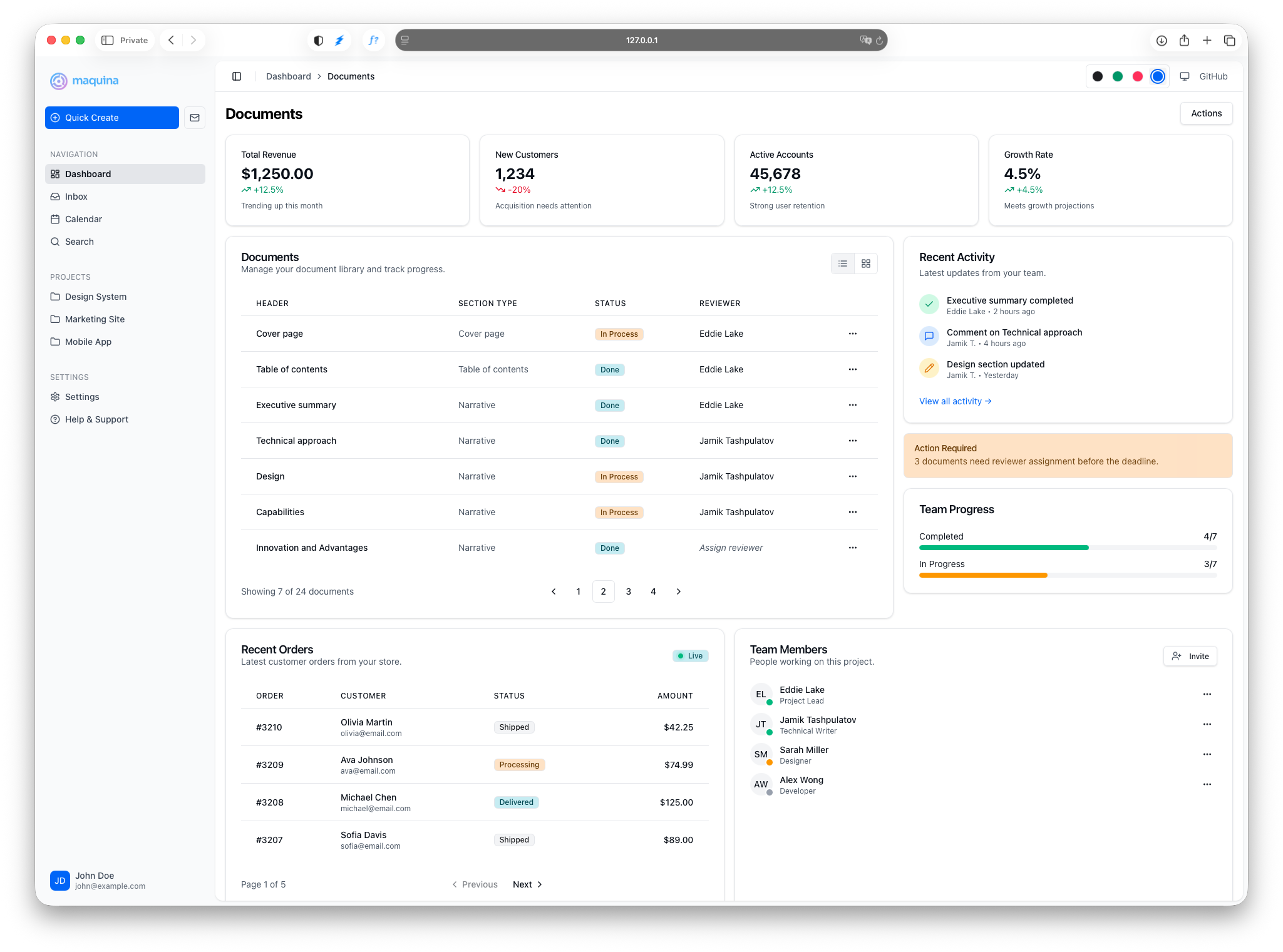

Demo Application
Explore all components in action without installing anything. The demo showcases light/dark themes, color themes, and responsive layouts.
For local development, clone the components repository:
git clone https://github.com/maquina-app/maquina_components.git
cd maquina_components/test/dummy
bin/rails server
Visit http://localhost:3000 to explore the components locally.
Quick Start
1. Add the Gem
# Gemfile
gem "maquina-components"
bundle install
2. Run the Install Generator
bin/rails generate maquina_components:install
This adds the engine CSS import, theme variables (shadcn/ui convention), and a helper file for icon customization.
3. Start Using Components
<%= render "components/card" do %>
  <%= render "components/card/header" do %>
    <%= render "components/card/title", text: "Welcome" %>
  <% end %>
  <%= render "components/card/content" do %>
    <p>Your content here</p>
  <% end %>
<% end %>
For form elements, use data attributes:
<%= form_with model: @user do |f| %>
  <%= f.text_field :email, data: { component: "input" } %>
  <%= f.submit "Save", data: { component: "button", variant: "primary" } %>
<% end %>
AI-Assisted Development
Use the Maquina UI Standards Claude Code plugin to generate views that follow component conventions automatically.
Instead of correcting AI-generated code (“use the card partial, not a div”), the plugin teaches Claude your component patterns:
> Create the users index view with a table showing name, email, and status
Claude generates code using your actual components — proper partials, correct data attributes, and consistent patterns.
Available Components
Layout
| Component | Description |
|---|---|
| Sidebar | Collapsible navigation with mobile support and keyboard shortcuts |
| Header | Page header for sidebar layouts with breadcrumbs and actions |
Content
| Component | Description |
|---|---|
| Card | Content containers with header, body, and footer sections |
| Alert | Callouts with 4 variants and icon support |
| Badge | Status indicators with 7 variants and 3 sizes |
| Table | Responsive data tables with sorting and sticky headers |
| Empty State | Placeholder for no-data scenarios with icons and actions |
Navigation
| Component | Description |
|---|---|
| Breadcrumbs | Navigation with responsive collapsing support |
| Dropdown Menu | Actions menu triggered by a button with keyboard navigation |
| Pagination | Navigation for paginated content with Pagy integration |
Interactive
| Component | Description |
|---|---|
| Calendar | Date selection with single and range modes |
| Combobox | Searchable dropdown with keyboard navigation and filtering |
| Date Picker | Popover calendar triggered by a button for date selection |
| Toggle Group | Single or multiple selection button groups |
Feedback
| Component | Description |
|---|---|
| Toast | Non-intrusive notifications with auto-dismiss and variants |
Forms
| Component | Description |
|---|---|
| Form Components | Inputs, selects, checkboxes styled with data attributes |
Prerequisites
The generator requires tailwindcss-rails:
bundle add tailwindcss-rails
bin/rails tailwindcss:install
Stimulus Setup
Interactive components (Sidebar, Dropdown Menu, Toggle Group, Breadcrumbs, Combobox, Toast) require Stimulus. With importmaps:
# config/importmap.rb
pin "@hotwired/turbo-rails", to: "turbo.min.js"
pin "@hotwired/stimulus", to: "stimulus.min.js"
pin "@hotwired/stimulus-loading", to: "stimulus-loading.js"
pin_all_from "app/javascript/controllers", under: "controllers"
// app/javascript/application.js
import "@hotwired/turbo-rails"
import { Application } from "@hotwired/stimulus"
import { eagerLoadControllersFrom } from "@hotwired/stimulus-loading"

const application = Application.start()
application.debug = false
window.Stimulus = application

eagerLoadControllersFrom("controllers", application)
Static components (Badge, Card, Alert, Button, form elements) work without JavaScript.
Theme Variables
Components use CSS variables following the shadcn/ui theming convention.
Variables must be defined twice for Tailwind CSS v4:
:root {
  --primary: oklch(0.205 0 0);           /* Actual value */
}

@theme {
  --color-primary: var(--primary);        /* Enables: bg-primary, text-primary */
}
Customizing Colors
Edit the values in :root to match your brand:
:root {
  /* Blue primary */
  --primary: oklch(0.488 0.243 264.376);
  --primary-foreground: oklch(0.985 0 0);
}
Icon System
Components use icon_for(:name) to render icons. Override icon lookup in app/helpers/maquina_components_helper.rb:
module MaquinaComponentsHelper
  def main_icon_svg_for(name)
    case name
    when :home
      <<~SVG
        <svg xmlns="http://www.w3.org/2000/svg" width="24" height="24" viewBox="0 0 24 24" fill="none" stroke="currentColor" stroke-width="2" stroke-linecap="round" stroke-linejoin="round">
          <path d="M15 21v-8a1 1 0 0 0-1-1h-4a1 1 0 0 0-1 1v8"/>
          <path d="M3 10a2 2 0 0 1 .709-1.528l7-5.999a2 2 0 0 1 2.582 0l7 5.999A2 2 0 0 1 21 10v9a2 2 0 0 1-2 2H5a2 2 0 0 1-2-2z"/>
        </svg>
      SVG
    end
  end
end
Icons are sourced from Lucide. Copy SVG code directly from their website.
Generator Options
# Skip theme variables (if you already have them)
bin/rails generate maquina_components:install --skip-theme

# Skip helper creation
bin/rails generate maquina_components:install --skip-helper

# Skip both
bin/rails generate maquina_components:install --skip-theme --skip-helper
File Structure After Setup
app/
├── assets/tailwind/
│   └── application.css               # Theme + engine import
├── helpers/
│   └── maquina_components_helper.rb  # Icon override
├── javascript/
│   └── application.js                # Stimulus init
└── views/layouts/
    └── application.html.erb          # Layout with components
Troubleshooting
Generator Issues
“tailwindcss-rails doesn’t appear to be installed”
Install it first:
bundle add tailwindcss-rails
bin/rails tailwindcss:install
Runtime Issues
Sidebar trigger not working
- Ensure Stimulus is initialized
- Verify provider wraps both sidebar and content
- Check browser console for errors
Styles not applying
- Verify engine CSS is imported after
@import "tailwindcss"; - Check that
@themeblock exists with color bindings - Restart dev server after CSS changes
Dark mode not working
- Add
.darkclass to<html>element - Ensure
.dark { }block has variable overrides