
Rails has opinions about most things. Database migrations, routing, asset handling, background jobs. But when it comes to building user interfaces, you’re on your own.
The framework gives you excellent primitives: importmaps, Stimulus, Turbo. But no default components. No standard way to build a button, a card, or a data table. Every Rails developer reinvents these from scratch.
Maquina Components is my attempt to fill this gap—not the definitive solution, but one practical approach that works for how I build applications.
Why This Exists
I started building components inspired by shadcn/ui for production Rails applications—dashboards, admin interfaces, internal tools. Over time, these components spread across multiple projects and became inconsistent: different APIs, different styling approaches, different levels of completeness.
It was time to extract the elements I use most and give them a cohesive API and consistent styling.
The Technical Choices
I chose ERB partials with Tailwind CSS and Stimulus controllers for interactive elements. For static components like form inputs, pure CSS with data attributes is enough.
<%= render "components/card" do %>
  <%= render "components/card/header" do %>
    <%= render "components/card/title", text: "Projects" %>
  <% end %>
  <%= render "components/card/content" do %>
    <%= render "components/table", collection: @projects %>
  <% end %>
<% end %>
I’m aware of alternatives like ViewComponent and Phlex. The projects I extracted these components from didn’t use them. I see the benefits of using a Ruby class to render UI, but bringing either library into a project is a commitment—not all teams are ready to make it.
The reason isn’t technical. It’s the perception of moving away from “the Rails way.” ERB partials are what Rails developers learn first. They’re simple, they work, and everyone understands them immediately.
What’s Included
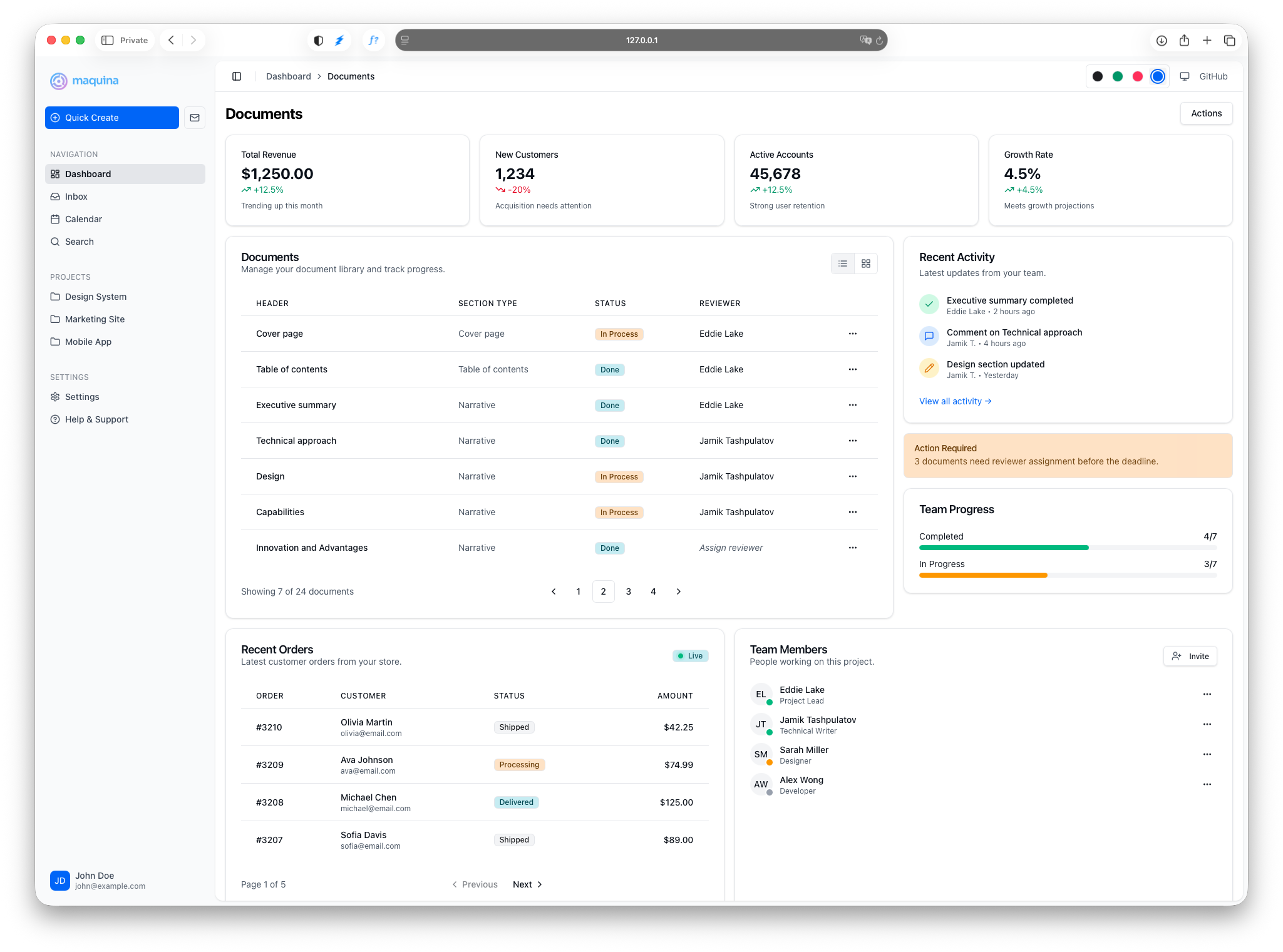
Twelve components extracted from production applications:
| Category | Components |
|---|---|
| Layout | Sidebar, Header |
| Content | Card, Alert, Badge, Table, Empty State |
| Navigation | Breadcrumbs, Dropdown Menu, Pagination |
| Interactive | Toggle Group |
| Forms | Input, Select, Checkbox, Button (via data attributes) |
Each component follows the shadcn/ui theming convention with CSS variables. Light and dark mode work out of the box.
Composability Over Convenience
These components are intentionally small. A card is five partials: wrapper, header, title, description, content, footer. That’s more code to write than a single <%= card(...) %> helper.
But composition is the point. You take these partials and build larger, application-specific components. A ProjectCard that combines Card + Badge + Button. A UserTable that extends Table with custom columns. There are no limits because you own the abstraction layer.
What I Didn’t Build
I didn’t port shadcn/ui one-to-one. I extracted only the components I actually use. This is a practical toolkit, not a complete design system.
If you need modals, tooltips, date pickers, or complex form builders—those aren’t here yet. They might come later if I need them in my own projects.
The Rails Frontend Landscape
There’s no single UI kit that dominates Rails development. The community has fragmented across different approaches:
- ViewComponent and Phlex for Ruby-based component abstractions
- Inertia.js for React/Vue integration
- Various shadcn/ui ports with different philosophies
Evil Martians has written extensively about modern frontend in Rails. Their work with ViewComponent and Inertia.js is excellent, but those approaches add dependencies I prefer to avoid.
Maquina Components takes a different path: standard ERB, standard Tailwind, minimal JavaScript. If you’re building server-rendered Rails applications and want components that don’t require learning a new paradigm, this might work for you.
Alternatives
If this approach doesn’t resonate, here are alternatives worth exploring:
- RailsUI — Premium UI templates and components
- RailsBlocks — Copy-paste components for Rails
- shadcn-rails — Another shadcn/ui port
- Inertia Rails Starter — React/Vue with Inertia
Getting Started
bundle add maquina_components
rails generate maquina_components:install
The generator adds the engine CSS, theme variables, and a helper file for icon customization.
Browse the documentation for examples and API details. The test/dummy application in the repository shows all components with demo data.
Open Source
Maquina Components is MIT licensed. The source is on GitHub.
If you try it and have feedback, I’d like to hear it. If this isn’t for you, that’s okay too. Rails is big enough for many approaches.