Version 0.3.0 of [Maquina Components](/blog/2025/12/announcing-maquina-components-opinionated-ul-for-rails-applications/) adds two frequently requested interactive components: **Combobox** and **Toast**.
Both components follow the same philosophy as the rest of the library—ERB partials, Tailwind CSS, and Stimulus controllers only where necessary.
## Combobox
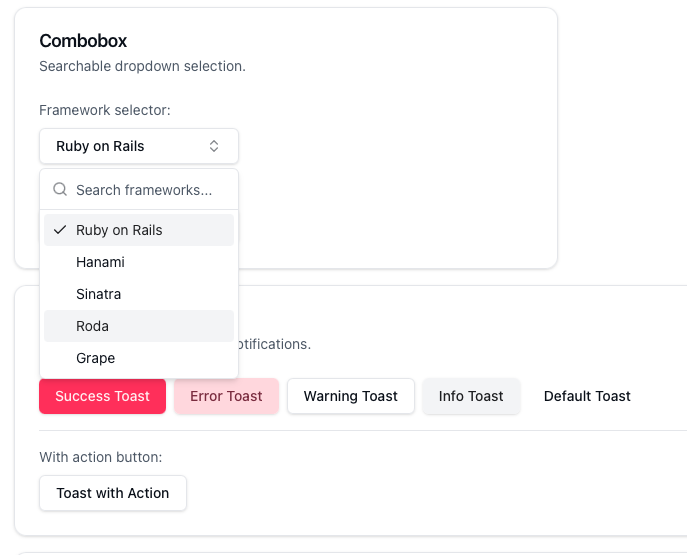 An autocomplete input with a searchable dropdown list. Useful when selecting from many options—countries, users, tags, or any list that benefits from filtering.
```erb
<%%= combobox placeholder: "Select framework..." do |cb| %>
<%% cb.trigger %>
<%% cb.content do %>
<%% cb.input placeholder: "Search..." %>
<%% cb.list do %>
<%% cb.option value: "rails" do %>Ruby on Rails<%% end %>
<%% cb.option value: "django" do %>Django<%% end %>
<%% cb.option value: "phoenix" do %>Phoenix<%% end %>
<%% end %>
<%% cb.empty %>
<%% end %>
<%% end %>
```
For simpler use cases, the data-driven helper builds the entire structure from an array:
```erb
<%%= combobox_simple placeholder: "Select country...",
name: "user[country]",
options: Country.all.map { |c| { value: c.code, label: c.name } } %>
```
### Features
- Keyboard navigation (arrows, Home, End, Escape)
- Real-time filtering as you type
- Grouped options with labels and separators
- Multiple width and alignment options
- Full ARIA support (`role="combobox"`, `role="listbox"`)
### Requirements
The Combobox uses the HTML5 Popover API for light-dismiss behavior. Most modern browsers support it natively:
| Browser | Version |
|---------|---------|
| Chrome | 114+ |
| Edge | 114+ |
| Safari | 17+ |
| Firefox | 125+ |
For older browsers, add the [popover polyfill](https://github.com/oddbird/popover-polyfill):
```bash
npm install @oddbird/popover-polyfill
```
```javascript
// app/javascript/application.js
import "@oddbird/popover-polyfill"
```
## Toast
An autocomplete input with a searchable dropdown list. Useful when selecting from many options—countries, users, tags, or any list that benefits from filtering.
```erb
<%%= combobox placeholder: "Select framework..." do |cb| %>
<%% cb.trigger %>
<%% cb.content do %>
<%% cb.input placeholder: "Search..." %>
<%% cb.list do %>
<%% cb.option value: "rails" do %>Ruby on Rails<%% end %>
<%% cb.option value: "django" do %>Django<%% end %>
<%% cb.option value: "phoenix" do %>Phoenix<%% end %>
<%% end %>
<%% cb.empty %>
<%% end %>
<%% end %>
```
For simpler use cases, the data-driven helper builds the entire structure from an array:
```erb
<%%= combobox_simple placeholder: "Select country...",
name: "user[country]",
options: Country.all.map { |c| { value: c.code, label: c.name } } %>
```
### Features
- Keyboard navigation (arrows, Home, End, Escape)
- Real-time filtering as you type
- Grouped options with labels and separators
- Multiple width and alignment options
- Full ARIA support (`role="combobox"`, `role="listbox"`)
### Requirements
The Combobox uses the HTML5 Popover API for light-dismiss behavior. Most modern browsers support it natively:
| Browser | Version |
|---------|---------|
| Chrome | 114+ |
| Edge | 114+ |
| Safari | 17+ |
| Firefox | 125+ |
For older browsers, add the [popover polyfill](https://github.com/oddbird/popover-polyfill):
```bash
npm install @oddbird/popover-polyfill
```
```javascript
// app/javascript/application.js
import "@oddbird/popover-polyfill"
```
## Toast
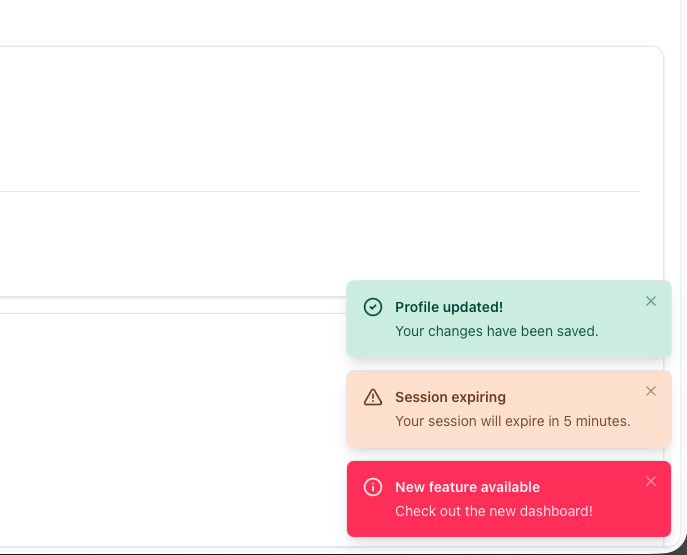 Non-intrusive notifications that appear temporarily and dismiss automatically. Ideal for form submission feedback, background task completion, or any transient message.
### Server-Side with Flash Messages
The most common pattern—render Rails flash messages as toasts:
```erb
<%# In your layout %>
<%%= render "components/toaster", position: :bottom_right do %>
<%%= toast_flash_messages %>
<%% end %>
```
```ruby
# In your controller
flash[:success] = "Profile updated successfully!"
redirect_to @user
```
Flash types map automatically to toast variants: `:success`, `:error`, `:warning`, `:info`.
### JavaScript API
For dynamic notifications without a page reload:
```javascript
Toast.success("Changes saved!")
Toast.error("Connection lost", {
description: "Please check your internet connection."
})
Toast.warning("Session expiring", { duration: 10000 })
// Dismiss programmatically
const id = Toast.info("Processing...")
Toast.dismiss(id)
```
### With Turbo Streams
Append toasts to the container in Turbo Stream responses:
```erb
<%# app/views/posts/create.turbo_stream.erb %>
<%%= turbo_stream.append "toaster" do %>
<%%= toast :success, "Post published!" %>
<%% end %>
```
### Features
- Five variants: default, success, info, warning, error
- Auto-dismiss with configurable duration (pauses on hover)
- Six positioning options (corners and center edges)
- Optional action buttons for undo/view operations
- Full keyboard accessibility
### Requirements
Toast requires Stimulus for the auto-dismiss timer and JavaScript API. Add the controller to your Stimulus application:
```javascript
// app/javascript/application.js
import { Application } from "@hotwired/stimulus"
import { eagerLoadControllersFrom } from "@hotwired/stimulus-loading"
const application = Application.start()
eagerLoadControllersFrom("controllers", application)
```
## Upgrading
```bash
bundle update maquina_components
```
No generator changes are required. Both components use the existing theme variables.
## See Them in Action
To explore Combobox, Toast, and all other components with demo data, clone the repository and run the dummy application:
```bash
git clone https://github.com/maquina-app/maquina_components.git
cd maquina_components/test/dummy
bin/dev
```
Then visit [http://localhost:5300](http://localhost:5300) to interact with the full component showcase.
## Documentation
- [Combobox documentation](/documentation/components/combobox/)
- [Toast documentation](/documentation/components/toast/)
- [Full component list](/documentation/components/)
## Source
The gem is MIT licensed. Source and issues on [GitHub](https://github.com/maquina-app/maquina_components).
Non-intrusive notifications that appear temporarily and dismiss automatically. Ideal for form submission feedback, background task completion, or any transient message.
### Server-Side with Flash Messages
The most common pattern—render Rails flash messages as toasts:
```erb
<%# In your layout %>
<%%= render "components/toaster", position: :bottom_right do %>
<%%= toast_flash_messages %>
<%% end %>
```
```ruby
# In your controller
flash[:success] = "Profile updated successfully!"
redirect_to @user
```
Flash types map automatically to toast variants: `:success`, `:error`, `:warning`, `:info`.
### JavaScript API
For dynamic notifications without a page reload:
```javascript
Toast.success("Changes saved!")
Toast.error("Connection lost", {
description: "Please check your internet connection."
})
Toast.warning("Session expiring", { duration: 10000 })
// Dismiss programmatically
const id = Toast.info("Processing...")
Toast.dismiss(id)
```
### With Turbo Streams
Append toasts to the container in Turbo Stream responses:
```erb
<%# app/views/posts/create.turbo_stream.erb %>
<%%= turbo_stream.append "toaster" do %>
<%%= toast :success, "Post published!" %>
<%% end %>
```
### Features
- Five variants: default, success, info, warning, error
- Auto-dismiss with configurable duration (pauses on hover)
- Six positioning options (corners and center edges)
- Optional action buttons for undo/view operations
- Full keyboard accessibility
### Requirements
Toast requires Stimulus for the auto-dismiss timer and JavaScript API. Add the controller to your Stimulus application:
```javascript
// app/javascript/application.js
import { Application } from "@hotwired/stimulus"
import { eagerLoadControllersFrom } from "@hotwired/stimulus-loading"
const application = Application.start()
eagerLoadControllersFrom("controllers", application)
```
## Upgrading
```bash
bundle update maquina_components
```
No generator changes are required. Both components use the existing theme variables.
## See Them in Action
To explore Combobox, Toast, and all other components with demo data, clone the repository and run the dummy application:
```bash
git clone https://github.com/maquina-app/maquina_components.git
cd maquina_components/test/dummy
bin/dev
```
Then visit [http://localhost:5300](http://localhost:5300) to interact with the full component showcase.
## Documentation
- [Combobox documentation](/documentation/components/combobox/)
- [Toast documentation](/documentation/components/toast/)
- [Full component list](/documentation/components/)
## Source
The gem is MIT licensed. Source and issues on [GitHub](https://github.com/maquina-app/maquina_components).